Getting gm by Id vs Id by W by L graphs in Cadence

15 January 2026 Link


The following steps need to be done for getting the gm/Id vs Id/(W/L) graphs in Cadence for a MOS transistor.

Create the schematic

The schematic is a simple transistor schematic. The schematic below shows an example:
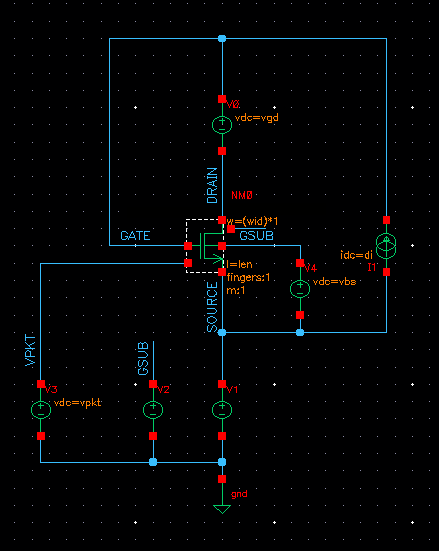


The above schematic shows that the drain current(di), vgd, vbs, W and L are parameterized and they are sweeped in the simulation script (except vbs) to get the graphs for a wide range of conditions and check the variation of the graph for them.

Save Operating Point Info

Create a text file called mysaves_t18.scs and add the following line in it:

save MN0_PSP.m0:oppoint


Now add this file with path in ADE->Setup->Simulation Files->Definition Files
Note that the .m0 is only needed because this model is implemented as s Sub Circuit in the models file. If the model is not a subcircuit and something direct like a BSIM model then .m0 would not be needed.

Setup simulation in ADE

Setup the DC sweep simulation in ADE by DC sweeping di from a low value to a high value for a typical vgd, W and L. Set the sweep to be logarithmic with 50 points per decade. Also setup expressions to calculate
  1. gm/Id = gm/di expression: (getData("MNO_PSP.m0:gm" ?result "dc-dc")/IS("/V1/PLUS"))
  2. Id/(W/L) expression: (IS("/V1/PLUS")/(5e-6/180e-9))

Run the Simulation and see the results.

Create the Ocean Script

Save the Ocean Script from the ADE environment and modify it to look like the following:

  1. simulator( 'spectre )
  2. design( "/n/u/nmos_gm_by_Id/spectre/schematic/netlist/netlist")
  3. resultsDir( "/n/u/nmos_gm_by_Id/spectre/schematic" )
  4. modelFile(
  5. '("/d/spectre_model/proc/models.scs" "tt")
  6. )
  7. definitionFile(
  8. "~/mysaves.scs"
  9. )
  10.  
  11. ; Modified mysim procedure - use fprintf to write clean data
  12. procedure(mysim(istart istop length width vgd fileHandle writeIdCol)
  13. analysis('dc ?param "di" ?start istart ?stop istop ?dec "50" )
  14. desVar( "l" length )
  15. desVar( "vgd" vgd )
  16. desVar( "di" 5u )
  17. desVar( "w" width )
  18. envOption(
  19. 'enableNoiseRefactor nil
  20. 'analysisOrder list("dc")
  21. )
  22. option( 'additionalArgs "ignorezerovar=yes"
  23. 'checklimitdest "both"
  24. 'dochecklimit "yes"
  25. )
  26. option( ?categ 'turboOpts
  27. 'disableVddOverride nil
  28. )
  29. save( 'i "/V0/PLUS" )
  30. temp( 27 )
  31. run()
  32.  
  33. gm_by_Ids = (getData("MN0.DX_NMOS:gm" ?result "dc") / IS("/V0/PLUS"))
  34. id_by_w_l = ((IS("/V0/PLUS") * VAR("l")) / VAR("w"))
  35.  
  36. ; Get the y-vectors directly and write with fprintf
  37. yVec_id = drGetWaveformYVec(id_by_w_l)
  38. yVec_gm = drGetWaveformYVec(gm_by_Ids)
  39. numPoints = drVectorLength(yVec_id)
  40.  
  41. for(i 0 numPoints-1
  42. if(writeIdCol then
  43. fprintf(fileHandle "%e,%e\n" drGetElem(yVec_id i) drGetElem(yVec_gm i))
  44. else
  45. fprintf(fileHandle "%e\n" drGetElem(yVec_gm i))
  46. )
  47. )
  48. )
  49.  
  50. ; Helper procedure to format engineering values for header
  51. procedure(formatEngValue(val)
  52. cond(
  53. (val >= 1e-6 && val < 1e-3 sprintf(nil "%.3gu" val*1e6))
  54. (val >= 1e-9 && val < 1e-6 sprintf(nil "%.3gn" val*1e9))
  55. (val >= 1e-3 && val < 1 sprintf(nil "%.3gm" val*1e3))
  56. (t sprintf(nil "%.3g" val))
  57. )
  58. )
  59.  
  60. ; Lists for iterating the simulation
  61. ;length_list = list(180e-9 500e-9 1e-6 1.5e-6 2e-6 2.5e-6 3e-6 3.5e-6 4e-6 4.5e-6 5e-6 5.5e-6 6e-6 6.5e-6 7e-6 7.5e-6 8e-6 8.5e-6 9e-6 9.5e-6 10e-6)
  62. length_list = list(0.6e-6 1e-6)
  63. width_list = list(0.9e-6 1.5e-6)
  64. ;width_list = list(2e-6 4e-6 6e-6 8e-6 10e-6 15e-6 20e-6)
  65. ;vgd_list = list(0.3 0 -0.3 -0.6 -0.9)
  66. vgd_list = list(0.3 0)
  67.  
  68. min_IdbyWL = 1e-9
  69. max_IdbyWL = 200e-6
  70.  
  71.  
  72. ; Initialize: Create the main CSV file with header starting with Id/(W/L)
  73. headerFile = outfile("~/gmByIdCurves.csv" "w")
  74. fprintf(headerFile "Id/(W/L)\n")
  75. close(headerFile)
  76.  
  77. ; Flag to track first iteration (need to write Id column)
  78. firstIteration = t
  79.  
  80. ; Loop through all the lists
  81. foreach( vgd vgd_list
  82. foreach( width width_list
  83. foreach(length length_list
  84. ; Calculate istart, istop so that Id/(W/L) starts and stops the same for every W/L combination
  85. istart = min_IdbyWL*width/length
  86. istop = max_IdbyWL*width/length
  87.  
  88. ; Create column header string WITHOUT leading comma
  89. colHeader = sprintf(nil "W=%s;L=%s;Vgd=%g;I=%s"
  90. formatEngValue(width)
  91. formatEngValue(length)
  92. float(vgd)
  93. formatEngValue(istart))
  94.  
  95. ; Write the data to a temp file
  96. tempFile = outfile("~/gmByIdtmp.out" "w")
  97. mysim(istart istop length width vgd tempFile firstIteration)
  98. close(tempFile)
  99.  
  100. ; Process temp file and merge
  101. if( firstIteration then
  102. ; First iteration: add header via sed (add comma here) and append data
  103. system(sprintf(nil "sed -i '1s/$/,%s/' ~/gmByIdCurves.csv" colHeader))
  104. system("cat ~/gmByIdtmp.out >> ~/gmByIdCurves.csv")
  105. firstIteration = nil
  106. else
  107. ; Subsequent iterations: extract only the gm/Id column
  108. system("awk -F',' '{print $1}' ~/gmByIdtmp.out > ~/gmByIdcol.tmp")
  109. ; Add column header as first line (no leading comma - paste adds it)
  110. system(sprintf(nil "(echo '%s'; cat ~/gmByIdcol.tmp) > ~/gmByIdcol2.tmp" colHeader))
  111. system("mv ~/gmByIdcol2.tmp ~/gmByIdcol.tmp")
  112. system("paste -d',' ~/gmByIdCurves.csv ~/gmByIdcol.tmp > ~/gmByIdinter.out")
  113. system("mv ~/gmByIdinter.out ~/gmByIdCurves.csv")
  114. system("rm -f ~/gmByIdcol.tmp")
  115. )
  116. )
  117. )
  118. )
  119.  
  120. ; Remove the temporary files
  121. system("rm -f ~/gmByIdtmp.out")
  122.  
  123. printf("Done! Results written to ~/gmByIdCurves.csv\n")


Save this ocean script (say 'gmByIdScript.ocn') and load it from the CIW window by typing:

load("gmByIdScript.ocn")


This would start the simulations and at the end we would have the file gmByIdCurves.csv with all the simulation results.

Draw the Graph using MATLAB

Finally create the following script in MATLAB and name it mergeGraphs.m and run it to create the graphs in a figure:
  1. % Script to read gmbyId.txt and merge the readings to just 1 graph
  2. % 1st column is taken as Current, 2nd column as Id/(W/L), 3rd column as
  3. % gm/Id
  4. % Remove the 1st 2 lines as the header lines
  5.  
  6. arr = textread('gmByIdCurves.csv','',-1,'headerlines',2,'headercolumns',0);
  7.  
  8. figure(1);
  9. for count = 2:3:size(arr,2)
  10. semilogx(arr([1:size(arr,1)],count),arr([1:size(arr,1)],count+1),'r');
  11. hold on;
  12. end
  13. grid on;
  14.  
  15. xlabel('Id/(W/L)')
  16. ylabel('gm/Id')
  17. title('gm/Id vs Id/(W/L) for 2V NMOS TSMC 0.18\mum RF; 180nm \leq L \leq 10\mum, 2\mum \leq W \leq 20\mum, 0.3V \leq Vgd \leq -0.9V')


Drawing the Graph using gsl-shell

Use the following script. The script can be loaded in gsl-shell using the command dofile('script_path_and_name').
  1. csv = require 'csv'
  2. t=csv.read('MyScripts/gmByIdCurves.csv')
  3. -- Convert it to a 2D numeric array since the csv is space separated and not "," separated
  4. curves = {}
  5. for i = 4,#t do
  6. curves[#curves+1] = {}
  7. for n in string.gmatch(t[i][1],"%S+") do
  8. curves[#curves][#curves[#curves]+1] = tonumber(n)
  9. end
  10. end
  11.  
  12. -- Now all the data table is in Curves:
  13. -- 1st column is drain current
  14. -- 2nd column is Id/(W/L)
  15. -- 3rd column is gm/Id
  16. -- And it repeats
  17. p = graph.plot()
  18.  
  19. for i = 2,#curves[1],3 do
  20. -- Create the line here
  21. ln = graph.path(math.log10(curves[1][i]),curves[1][i+1])
  22. for j = 2,#curves do
  23. ln:line_to(math.log10(curves[j][i]),curves[j][i+1])
  24. end
  25. p:addline(ln)
  26. end
  27. p:show()


Sample Graph

Shown below is a sample graph from the above steps:
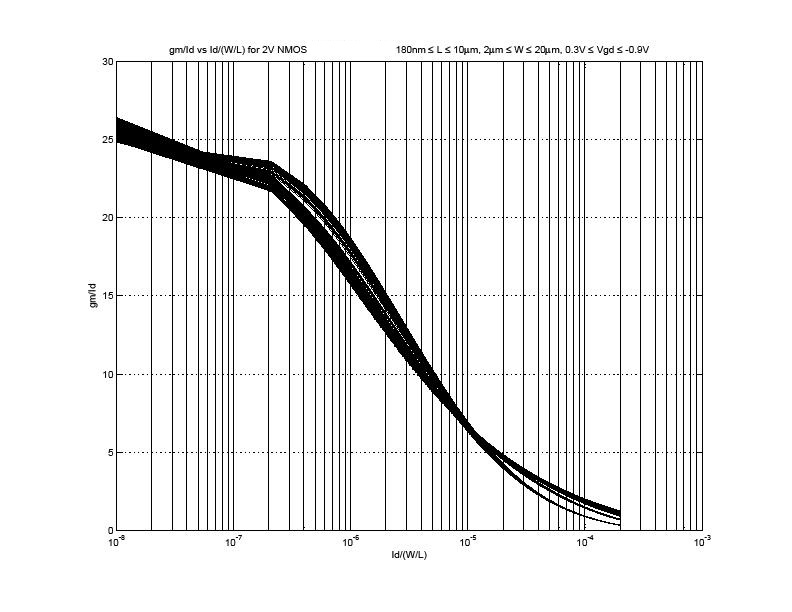


NOTE This graph was taken with a linear sweep a better graph will result of the sweep is set to logarithmic especially with no discontinuity in the slope as it seems in this one.

References